Showing posts with label Object Oriented Analysis and Design Lab. Show all posts

Saturday, March 12, 2011

Recruitment System VB Project

In this post I am explaining how to create a simple mini project for Recruitment System using Visual Basic.

I am using VB 6.0 because many colleges still use that and are yet to update to Visual Studio 2010. 

Disclaimer - You can use this code for your project, but must not use as it is. Make some changes and then use it.

Download the Project in VB 6.0


Project Details


Front End : Visual Basic
Back End - MS Access (You can use Oracle however)

Steps Involved

1. Creating the database
  • In Visual Basic 6.0 open Add-Ins -> Visual Data Manger.
  • Select File -> New -> Microsoft Access ->Version 7.0 mdb.
  • Name it as 'record'
  • Create a table named 'record' with following fields
  1. Name - Text
  2. Age - Text
  3. DOB - Date
  4. Phno - Text
  5. Qualification - Text
  6. Percentage - Text
  7. Id - Integer
  8. Status - Text with size as 250. 
  • Now Select 'Build the table'. Your table gets created.
2. Creating the 'Home form' 

Before starting with the project go to Project->References and add Microsoft ActiveX Data Objects 2.0 Library and click ok. This is important. 

Design the form as shown below,


The basic idea here is that if a person is an applicant he can select wither 'Register' or 'Status' button. However if he is an HR then a login panel has given to them to differentiate them from applicants. Only after proper username and password they can enter into Admin Panel. If he provides a wrong password the Recruitment System will display an error.

The components in this form are,

(The text within brackets refers to the 'Name' property of the corresponding control.)

Command Buttons
  • Register (Command2)
  • Know Status (Command1)
  • Login (Command4)
Textboxes 
  • Username (hr_username)
  • Password (hr_password0
Images
  • Exit (Image2)
Code for this form


Private Sub Command1_Click()
Status.Show
End Sub

Private Sub Command2_Click()
Register.Show
End Sub

Private Sub Command4_Click()

If hr_username = "admin" And hr_password = "admin" Then
hr_username = ""
hr_password = ""
Hr.Show
Else
MsgBox "Invalid Username / Password", vbCritical, "Recruitment System"
End If
End Sub

Private Sub Image2_Click()
Unload Me
End Sub


3. Creating the 'Register' form

Design the form as below,


Here the user can enter his personal information and when they click submit button their information is added to the database.

The components in this form are,

Textboxes
  • Name (Text1)
  • Age (Text2)
  • D.O.B (Text3)
  • Phone No (Text4)
  • Qualification (Text5)
  • Percentage (Text6)
Command Buttons
  • Submit (Command1)
A timer control (Timer1) to display the current time.

Code for this form

This contains the code for connecting Visual Basic 6.0 with MS Access.

Dim c As Integer

Private Sub Command2_Click()
Dim cn As New ADODB.Connection
Dim rs As New ADODB.Recordset
cn.Open "Provider=Microsoft.Jet.OLEDB.4.0;Data Source=" + App.Path + "\record.mdb;Persist Security Info=False"
rs.Open "record", cn, adOpenKeyset, adLockPessimistic, adCmdTable
c = c + 1
rs.AddNew
rs("Name") = Text1
rs("Age") = Text2
rs("DOB") = Text3
rs("Phno") = Text4
rs("Qualification") = Text5
rs("Percentage") = Text6
rs("Id") = c
rs("Status") = "Yet to be processed. Waiting for the response from HR. Stay Tuned for updates"
MsgBox "Registration Successful...Your Application id is " & c & "", vbInformation, "Recruitment System"
rs.Update
rs.Close
cn.Close
Unload Me
End Sub

Private Sub Form_Load()
Dim cn As New ADODB.Connection
Dim rs As New ADODB.Recordset
cn.Open "Provider=Microsoft.Jet.OLEDB.4.0;Data Source=" + App.Path + "\record.mdb;Persist Security Info=False"
rs.Open "select * from record", cn, adOpenKeyset, adLockOptimistic
c = rs.RecordCount
End Sub

Private Sub Timer1_Timer()
Label8.Caption = Now
End Sub
After the user enters the information the following dialog with 'Applicant Id' will be displayed


This applicant id will used by the applicant to check their application status. 

4. Creating the Status Form

Design the form as below,


The components in this form are,

Textboxes
  • Id (Text1)
  • Name (Text2)
  • Response text (Text3)
Command Button
  • Get Response (Command1)
Code for this form

Private Sub Command1_Click()
Dim cn As New ADODB.Connection
Dim rs As New ADODB.Recordset
cn.Open "Provider=Microsoft.Jet.OLEDB.4.0;Data Source=" + App.Path + "\record.mdb;Persist Security Info=False"
rs.Open "select * from record where Id=" & Text1.Text & "", cn, adOpenKeyset, adLockOptimistic
If (rs(0).Value = Text2.Text) Then
Text3.Text = rs(7).Value
Else
MsgBox "Please verify the details you have given", vbCritical, "Recruitment System"
End If
End Sub

4. Creating the HR Admin form

The HR user will enter after entering the correct username and password in the 'Home' form.


Design the Admin Panel form as follows,


Components in this form,

DataGrid

To display the list of applications. To add this go to Project-> Components and in the dialog box that appears select Microsoft DataGrid control 6.0 (OLEDB).

Textboxes
  • Enter Applicant Id (Text1)
  • Enter response message (Text2).
Command Button
  •  Delete Applicant Id (Command2)
Code for this form

Private Sub Command1_Click()
On Error Resume Next
Dim cn As New ADODB.Connection
Dim rs As New ADODB.Recordset
cn.Open "Provider=Microsoft.Jet.OLEDB.4.0;Data Source=" + App.Path + "\record.mdb;Persist Security Info=False"
rs.Open "update record set status='" + Text2.Text + "' where Id=" + Text1.Text + "", cn, adOpenKeyset, adLockOptimistic
MsgBox "Response sent successfully..", vbInformation, "Recruitment System"
Unload Me
Me.Show
End Sub

Private Sub Command2_Click()
On Error Resume Next
Dim cn As New ADODB.Connection
Dim rs As New ADODB.Recordset
cn.Open "Provider=Microsoft.Jet.OLEDB.4.0;Data Source=" + App.Path + "\record.mdb;Persist Security Info=False"
rs.Open "delete from record where Id=" & Text1.Text & "", cn, adOpenKeyset, adLockOptimistic
MsgBox "Delete successfully..", vbInformation, "Recruitment System"
Unload Me
Me.Show
End Sub

Private Sub Form_Load()

On Error Resume Next
Dim oconn As New ADODB.Connection
Dim rs As New ADODB.Recordset
Dim strSQL As String
strSQL = "select * from record"
Set oconn = New ADODB.Connection
oconn.Open "Provider=Microsoft.Jet.OLEDB.4.0;Data Source=" + App.Path + "\record.mdb;Persist Security Info=False"
rs.CursorType = adOpenStatic
rs.CursorLocation = adUseClient
rs.LockType = adLockOptimistic
rs.Open strSQL, oconn, adOpenKeyset, adLockOptimistic
Set DataGrid1.DataSource = rs
End Sub

Finally after this if the applicant checks his status, it will be displayed as follows,


Thats it!!! Your Project is completed in 5 Steps...:)

Hope You all liked it....If you like this I can post other projects that I did.

(The project has been put only under partial testing. There may be some slight errors in it. In case you find any please modify it or mail me.)

G.Vivek Venkatesh

Recruitment System UML Diagrams, SRS

Hi guys, in this post I have added the UML Diagrams for Recruitment system and a download link for problem statement and SRS.


Download Recruitment System Problem Statement and SRS

Download Recruitment System UML Diagrams

Use case diagram


Class Diagram


Sequence Diagram for 'Register'


Sequence Diagram for 'Status'


Sequence Diagram for 'Admin Panel'


Collaboration Diagram for 'Register'


Collaboraion Diagram for 'Status'


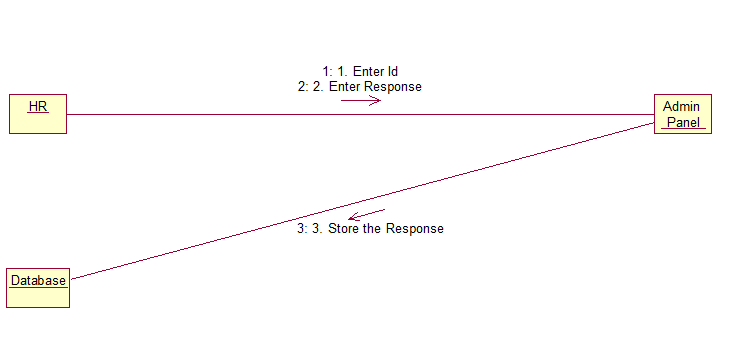
Collaboration Diagram for 'Admin Panel'


Activity Diagram

Monday, February 28, 2011

Book Bank System

PROBLEM STATEMENT:
Book bank system is where the books can be collected every semester and must be returned at the end of semester. The system must have option for new members to enroll for membership by paying deposit. A provision for getting six or seven books per semester. Membership can be renewed by using the register number. The deposit must be refunded on termination of membership. A database must be maintained to guide the issuer to track the details of students. Search option must be provided so that the member can search for the availability of a particular book.

SOFTWARE REQUIREMENT SPECIFICATION
TABLE OF CONTENTS
1.         1  Introduction
1.1  Purpose
1.2  Product scope
1.3  Document conventions
1.4  References
2.         2 Overall Description
2.1  Product Perspective
2.2  Product Functions
2.3  Tools to be used
  1. External Interface
3.1  Hardware Interface
3.2  Software Interface
  1. System Features
4.1  Requesting Books
4.1.1        System Description and Priority
4.1.2        Stimulus/response Sequence
4.1.3        Functional Requirements
  1. Other non-functional requirements
5.1   Performance Requirements
5.2   Safety Requirements
5.3   Security Requirements
   

1. INTRODUCTION
The book bank is a set up that lends books for all its members which they can return at the end of each semester. It has a huge collection of books and has to keep track of all its members’ details such as requests, dues and penalties and the books.
1.1 PURPOSE
The purpose of this document is to present a detailed description of the Book Bank System. It will explain the purpose and features of the system, the interfaces of the system, what the system will do, the constraints under which it must operate and how the system will react to external stimuli.   
1.2   SCOPE
The book bank holds an online interface with its members for maintaining all kinds of transaction details. Each member is provided with a unique user id at the time of registering as a member.
1.3   DOCUMENT CONVENTIONS
·         Director: The ultimate authority in the staff hierarchy of the book bank
·         Member: Any person who registers with the book bank
·         HTML-Hyper Text Markup Language used to create web page.

1.4    REFERENCES
www.reachbookbank.com
www.bookworldlibrary.com
2. OVERALL DESCRIPTION
2.1 PRODUCT PERSPECTIVE
This project is a self contained one for enabling a book bank organization to be connected with its students, through this system, the students can check for availability of books, makes requests, etc.
2.2 PRODUCT FUNCTIONS
This system functions with a database at the back end, for keeping track of its member’s dues and payments, and also its available resources. Every student who is a member needs only a web browser to connect to this system.
2.3 TOOLS TO BE USED
Visual basic and Microsoft Access
3. EXTERNAL INTERFACES

3.1 HARDWARE INTERFACES
The system should have good hardware support. The processor should have high speed and must be of high efficiency.
3.2 SOFTWARE INTERFACE
               The system uses ODBC drive to connect and control the database.
4. SYSTEM FEATURES
4.1 REQUESTING BOOKS
4.1.1 SYSTEM DESCRIPTION & PRIORITY
Allows a student, who becomes a member to login using a unique id issued at the time of registering as a member, and after logging in, the member can browse through available books and make requests accordingly. The books will be issued provided there is no due, regarding returning of previous books.
4.1.2 STIMULUS/RESPONSE SEQUENCE
Whenever the student wishes to get books, he/she checks for the availability by logging in. When the request is made, the director of the book bank decides on granting the request of book(s) after checking the member details for due in returning previous books.
4.1.3 FUNCTIONAL REQUIREMENTS
The member should be authenticated by means of unique login id and password. The availability of books requested must be prompted to the user through e-mail or sms notifications. 
5. OTHER NON-FUNCTIONAL REQUIREMENTS
5.1 PERFORMANCE REQUIREMENTS
The web interface should be able to support multiple users trying to log in simultaneously.
5.2 SAFETY REQUIREMENTS
The student details should be made available in the database and must be updated every time a book is issued or returned or some kind of payment takes place to prevent errors.
5.3 SECURITY REQUIREMENTS
The member can only access certain details from the database. He/she should not be able to modify the database nor has any of its information corrupted. Only the DBA must be bestowed with the privileges of handling any kind of modifications.

Wednesday, February 9, 2011

Passport Automation System UML Diagrams


Use case Diagram


Class Diagram


Sequence Diagram


New Registration


Check Status

Admin Panel


Activity Diagram


New Registration


Check Status


Admin Panel


Collaboration Diagrams

New Registration


Check Status

Admin Panel


Guys, I have attached most of the UML Diagrams for Passport Automation System..

Hope you like it..

Wishing you good Luck..:)

Disclaimer - The UML diagrams given might have some mistakes..So please take care when you use it and please do comment about any mistakes you find so that we can rectify it.

Wednesday, December 22, 2010

Passport Automation System

Problem statement and SRS(Software Requirements Specification) for Passport Automation System in OOAD Lab, Anna University.

(All of the information given below are just an example created for OOAD Lab exercise and not for any other purpose. And It is just a sample, with which you can build upon.)

Download the SRS for Passport Automation System


Problem Statement


Passport Automation System is used in the effective dispatch of passport to all of the applicants. This system adopts a comprehensive approach to minimize the manual work and schedule resources, time in a cogent manner. The core of the system is to get the online registration form (with details such as name, address etc.,)  filled by the applicant whose testament is verified for its genuineness by the Passport Automation System with respect to the already existing information in the database. This forms the first and foremost step in the processing of passport application. After the first round of verification done by the system, the information is in turn forwarded to the regional administrator's (Ministry of External Affairs) office. The application is then processed manually based on the report given by the system, and any forfeiting identified can make the applicant liable to penalty as per the law. The system also provides the applicant the list of available dates for appointment to 'document verification' in the administrator's office, from which they can select one. The system forwards the necessary details to the police for its separate verification whose report is then presented to the administrator. The administrator will be provided with an option to display the current status of application to the applicant, which they can view in their online interface. After all the necessary criteria has been met, the original information is added to the database and the passport is sent to the applicant. 

Software Requirements Specification

1.0 Introduction
    Passport Automation System is an interface between the Applicant and the Authority responsible for the Issue of Passport. It aims at improving the efficiency in the Issue of Passport and reduce the complexities involved in it to the maximum possible extent.
   
    1.1 Purpose

            If the entire process of 'Issue of Passport' is done in a manual manner then it would take several months for the passport to reach the applicant. Considering the fact that the number of applicants for passport is increasing every year, an Automated System becomes essential to meet the demand. So this system uses several programming and database techniques to elucidate the work involved in this process. As this is a matter of National Security, the system has been carefully verified and validated in order to satisfy it. 

    1.2 Scope

• The System provides an online interface to the user where they can fill in their personal details and submit the necessary documents (may be by scanning).
• The authority concerned with the issue of passport can use this system to reduce his workload and process the application in a speedy manner.
• Provide a communication platform between the applicant and the administrator.
• Transfer of data between the Passport Issuing Authority and the Local Police for verification of applicant's information.
• Users/Applicants will come to know their status of application and the date in which they must subject themselves for manual document verification.

    1.3 Definitions, Acronyms and the Abbreviations       

• Administrator - Refers to the super user who is the Central Authority who has been vested with the privilege to manage the entire system. It can be any higher official in the Regional Passport Office of Ministry of External Affairs.            
• Applicant - One who wishes to obtain the Passport.
• PAS - Refers to this Passport Automation System.
• HTML - Markup Language used for creating web pages.
• J2EE – Java 2 Enterprise Edition is a programming platform and it is the partof the java platform for developing and running distributed java applications.
• HTTP - Hyper Text Transfer Protocol.
• TCP/IP – Transmission Control Protocol/Internet Protocol is the communication protocol used to connect hosts on the Internet.

    1.4 References

            IEEE Software Requirement Specification format.

    1.5 Technologies to be used

• HTML
• JSP
• Javascript
• Java
• XML
• AJAX

    1.6 Tools to be Used   

• Eclipse IDE ( Integrated Development Enivronment)
• Rational Rose tool ( for developing UML Patterns)

    1.7 Overview   

            SRS includes two sections overall description and specific requirements - Overall description will describe major role of the system components and inter-connections. Specific requirements will describe roles & functions of the actors.
               

2.0 Overall Description

    2.1 Product Perspective

            The PAS acts as an interface between the 'applicant' and the 'administrator'. This system tries to make the interface as simple as possible and at the same time not risking the security of data stored in.This minimizes the time duration in which the user receives the passport. 

    2.2 Software Interface


Front End Client - The applicant and Administrator online interface is built using JSP and HTML. The Administrators's local interface is built using Java.
Web Server - Glassfish application server(Oracle Corporation).
Back End - Oracle database.

    2.3 Hardware Interface

            The server is directly connected to the client systems. The client systems have access to the database in the server.

    2.4 System Functions

• Secure Registration of information by the Applicants.
• Schedule the applicants an appointment for manual verification of original documents.
• Panel for Passport Application Status Display by the Administrator.       
• SMS and Mail updates to the applicants by the administrator.
• Administrator can generate reports from the information and is the only authorized personnel to add the eligible application information to the database.

    2.5 User Characteristics   

• Applicant - They are the people who desires to obtain the passport and submit the information to the database.
• Administrator - He has the certain privileges to add the passport status and to approve the issue of passport. He may contain a group of persons under him to verify            
the documents and give suggestion whether or not to approve the dispatch of passport.
• Police - He is the person who upon receiving intimation from the PAS, perform a personal verification of the applicant and see if he has any criminal case against him before or at present. He has been vetoed with the power to decline an application by suggesting it to the Administrator if he finds any discrepancy with the applicant. He communicates via this PAS.

    2.6  Constraints        

• The applicants require a computer to submit their information.
• Although the security is given high importance, there is always a chance of intrusion in the web world which requires constant monitoring.
• The user has to be careful while submitting the information. Much care is required.

    2.7 Use Case Model Description       


    2.8  Assumptions and Dependencies


• The Applicants and Administrator must have basic knowledge of computers and English Language.
• The applicants may be required to scan the documents and send.